How to Withdraw Money from Ludo Battle Game — Fast, Safe & Fee-Free
Winning feels great. Actually getting your money out? That’s where most players hit a wall. If you’ve been stacking up earnings in Ludo Battle Game and you’re ready to cash out, this guide walks you through the entire withdrawal process — from linking your wallet to hitting that final confirm button.
Follow the steps mentioned in this article to easily Withdraw Money from Ludo Battle Game. No confusing steps. No hidden fees. Let’s get into it.
What Withdrawal Methods Does Ludo Battle Game Support?
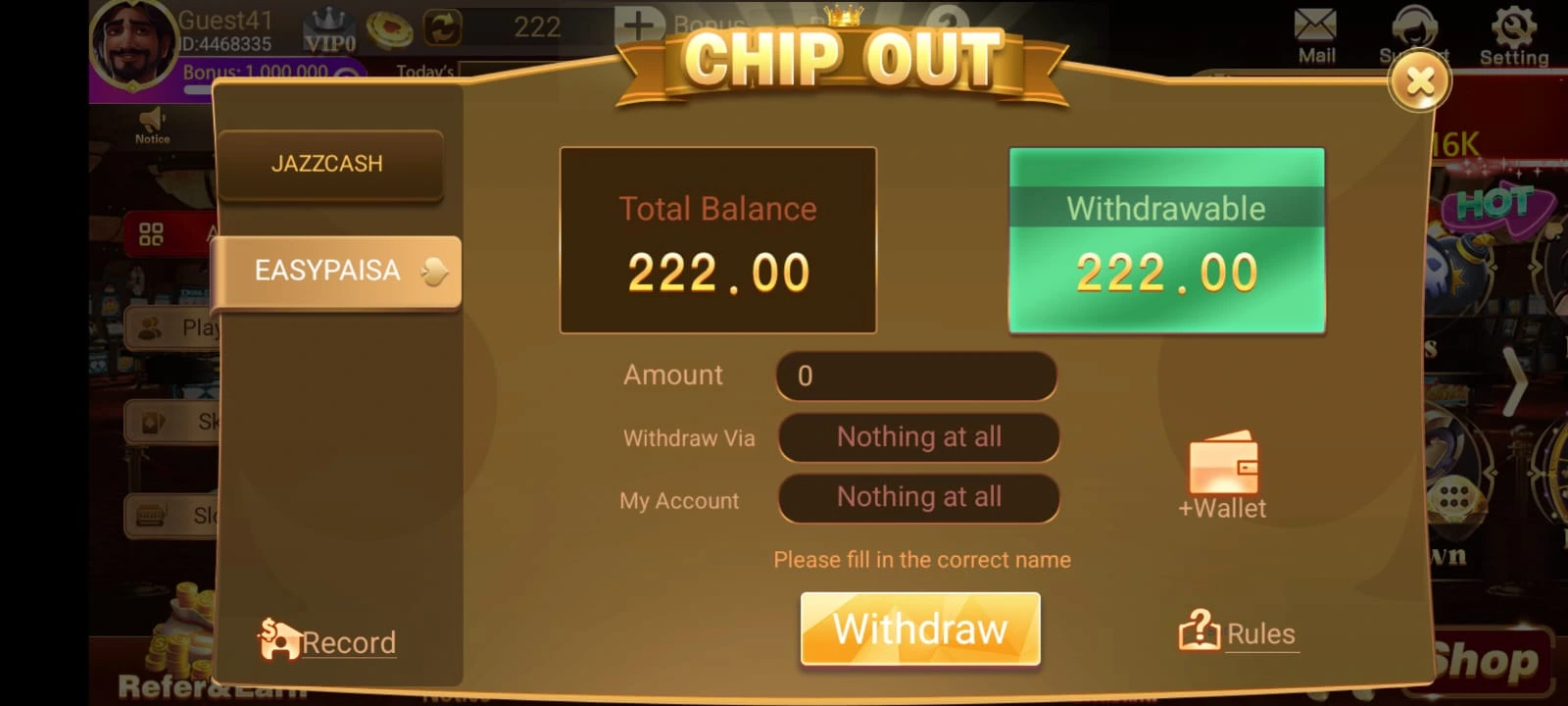
Before anything else, you need the right tool for the job. Ludo Battle Game currently supports two withdrawal methods, both of which are widely used across Pakistan:
- JazzCash
- EasyPaisa
If you don’t have an account on either platform, go ahead and create one first. The critical thing here — and don’t skip this — is to make sure your account is biometrically verified. An unverified account can block your transaction at the last second, which is genuinely frustrating when you’re ready to cash out.
Once you’re verified, take a quick look at your daily, weekly, and monthly transaction limits on whichever platform you choose. Those limits matter more than most people realize, and we’ll get to exactly why in a moment.
Step-by-Step: How to Withdraw Your Winnings from Ludo Battle Game
The process is straightforward once you know what you’re looking at. Here’s exactly how it works:
1. Create or Log Into Your Account You can technically withdraw as a guest player, but having a registered account makes everything smoother — especially if you ever need to contact support about a transaction. Log in with your username and password.
2. Tap the Withdraw Button On the home screen, look for the withdraw button on the bottom left. Tap it, and you’ll see the EasyPaisa and JazzCash options appear on the left side.
3. Link Your Digital Wallet Hit the “Add Wallet” button and fill in the form to bind your mobile wallet to your game account. Do this once, and it’s saved for future withdrawals.
4. Select Your Wallet If you’ve added more than one wallet, choose which one you want to use for this particular withdrawal.
5. Enter the Amount Type the amount you want to withdraw in the amount box. Keep your wallet limits in mind here — more on that below.
6. Confirm and Submit Double-check every detail you’ve entered. Then hit withdraw. You’ll get an “Application Successful” notification, which means your request is in the system.From there, you can track the status by heading to the Records section in the app. Most transactions go through in 1 to 10 minutes.
Withdrawal Limits: Read This Before You Request
This is the part that trips people up the most, so pay close attention.
Ludo Battle Game allows withdrawals of up to PKR 50,000 per transaction. If you want to move more than that, you can simply initiate multiple withdrawal requests — the game supports it.
However, your EasyPaisa or JazzCash account has its own set of limits, and those run independently from the game’s limits. If your mobile wallet’s daily cap is lower than what you’re trying to withdraw, the transaction will fail. Always cross-check both sets of limits before you start. It’s a 30-second check that saves a lot of headaches.
Common Mistakes That Can Cost You
Small oversights during a withdrawal can cause real problems. Here are the two most common ones — and how to avoid them.
Wrong Account Number
This one is serious. If you enter an incorrect account number and it happens to belong to someone else, your money lands in their wallet — and recovering it is nearly impossible. Always double-check the number you’ve entered. Better yet, withdraw a small amount first. Once that goes through successfully, you know your details are correct, and you can proceed with larger amounts confidently.
Withdrawing During a Maintenance Break
Ludo Battle Game undergoes scheduled maintenance to keep things secure and running smoothly. During these windows, deposits and withdrawals are temporarily disabled. The app sends you an in-game notification when this happens. If you try to withdraw during maintenance, you’ll run into issues — so just wait it out.
Tips for Safer, Smarter Withdrawals
These aren’t just generic safety reminders — they’re habits that experienced players actually use:
- Withdraw regularly. Keeping your game balance lean means your daily wallet limits reset and stay available. Don’t let winnings pile up unnecessarily.
- Always handle your own withdrawals. No one else should be doing this for you. It makes it easier to track what’s going where and protects you from scams.
- Ludo Battle will never ask for your username or password. If anyone reaches out claiming to be support member and asks for your credentials, that’s a scam. Full stop.
- Use a stable internet connection. Your transaction runs through both the game’s servers and your bank’s, so a shaky connection mid-withdrawal is a recipe for errors.
- Use a strong, unique password for your game account. It’s basic, but it works.
What to Do If Something Goes Wrong
Even with the best preparation, issues can pop up. If a transaction fails, the amount gets added right back to your game account — so you won’t lose your money in a failed attempt.For anything beyond that, Ludo Battle’s customer support is available 24/7. Tap the support button on the home screen and you’ll connect with the team directly. If you have a screenshot of the issue, share it — it speeds things up considerably. Most queries get resolved within minutes.
Final Words
Withdrawing your money from Ludo Battle Game is genuinely simple once you know the steps — link your JazzCash or EasyPaisa wallet, enter your amount, confirm, and you’re done. The most important things to get right are your account details and your wallet limits. Nail those two, and the rest takes care of itself. Contact support when required.
Now go enjoy what you earned.