How to Create an Account & Sign Up on Ludo Battle (Step-by-Step Guide)
If you are looking to jump into one of Pakistan’s most popular real-cash gaming platforms, learning how to create an account and sign up on Ludo Battle is your very first step. The process is fast and secure, but many Pakistani users — especially first-timers — run into confusion at the OTP stage or are unsure which login method suits their device.
This guide walks you through every step, highlights common mistakes, and ensures your profile is fully ready to play and earn.
Download the latest Ludo Battle APK from the official source before you begin.

Requirements Before Creating a Ludo Battle Account
Before tapping sign-up, make sure everything is in place. Missing one of these is the most common reason Pakistani users face delays during registration.
Basic Requirements: You will need an active mobile number or email address, a stable internet connection (4G or Wi-Fi is ideal; 3G may slow OTP delivery), and the Ludo Battle app installed from an official source.
Optional but Recommended: Having a Google or Facebook account linked to your device enables the fastest sign-up with no manual OTP entry. If you have a referral code, keep it handy — it can unlock a welcome bonus or extra coins during registration.
Pro Tip: On a low-end device (2 GB RAM or less), close all background apps before opening Ludo Battle to ensure smooth loading during registration.
Step-by-Step Guide to Sign Up on Ludo Battle
Follow each step in order and do not rush — especially at the OTP stage.
Download and Open the App
Make sure you have the latest game version installed. Outdated versions may fail to send OTPs correctly. Download the latest APK from the official source, allow installation from unknown sources if prompted, then open the app — you will land on the Welcome / Login screen.
If the app crashes on launch, free up at least 200 MB of storage and try again.
Choose Your Sign-Up Method
Ludo Battle Game offers three registration options. Mobile Number is the most common choice for Pakistani users and links directly to your SIM. Email Address is a reliable backup if mobile OTP keeps failing. Google or Facebook Login is the fastest option with no manual OTP required — ideal if you already have these apps on your phone.
Enter Your Details
Accuracy is critical here. A single typo in your mobile number sends the OTP to the wrong place, and you will have to restart the entire process. Enter your number with the correct Pakistani prefix (e.g., 03xx-xxxxxxx) or your full email, then double-check every character before tapping Continue.
Pro Tip: Avoid using a spare or inactive SIM. Your registered number must stay active for future account recovery.
Verify with OTP
The OTP is a 4–6 digit code valid for only 30–60 seconds. Wait 5–15 seconds for the SMS or email to arrive, enter the code exactly as received with no spaces, and tap Resend OTP immediately if it expires.
Pro Tip: In areas with weak signal, switch to Wi-Fi before requesting the OTP. Poor network is the leading cause of OTP delays across Pakistan.
Set Up Your Profile
Do not skip this step — an incomplete profile can restrict access to certain game modes and bonuses. Choose a unique username and avoid using your real name or phone number for privacy. Adding a profile picture is optional but makes your account feel more established to opponents.
Complete Registration
Read the Terms & Conditions — at minimum, note the rules around cash withdrawals and adding funds. Then tap Submit, Continue, or Register (the label varies by version). You will be redirected to the main dashboard — your account is now live.
Your Ludo Battle account is ready! Go to the dashboard and check for your welcome bonus now.
Different Sign-Up Methods Explained
In this section, you will find different sign-up methods you can use in the Ludo Battle game. Choose the one that you prefer after going through this section.
Sign Up Using Mobile Number
This is the preferred method for most Pakistani players. Your number becomes your primary account ID, making login and recovery simple from any device. Both prepaid and postpaid SIMs work perfectly — the only requirement is that your SIM is active and receiving SMS at the time of registration.
Sign Up Using Email
Ideal when mobile OTP consistently fails, which is common in areas with poor network coverage. After entering your email, an OTP or verification link will be sent to your inbox. If it does not arrive within two minutes, check your spam folder before requesting a resend.
Pro Tip: Use Gmail or Outlook for the most reliable OTP delivery. Local ISP email addresses can sometimes cause delays.
Social Media Login (Google / Facebook)
This is the fastest method available. Tap Google or Facebook, select your account, and registration is handled automatically — your display name and profile photo are imported too. It is especially convenient if you switch phones frequently, since you can log back in from any device without remembering a separate password.
How to Verify Your Ludo Battle Game Account
If you are not sure whether you created an account before, you can easily verify it using the method mentioned here.
Why Verification Is Important
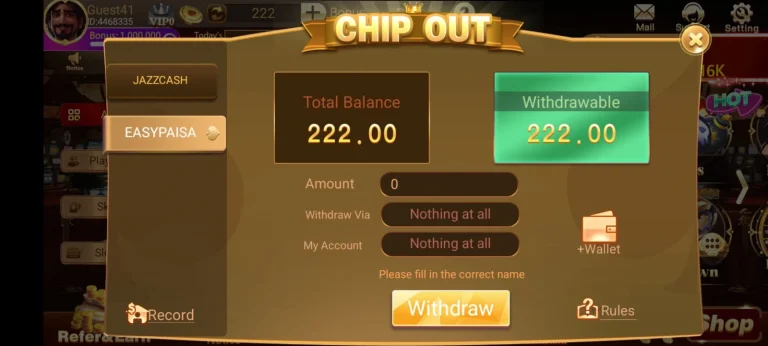
Verification is mandatory on Ludo Battle, but it also unlocks features that unverified accounts cannot access. A verified account can withdraw winnings to EasyPaisa or JazzCash, access real-cash game rooms and tournaments, and have its wallet balance and progress fully secured and recoverable.
Troubleshooting OTP Issues
If your OTP is not arriving, start by waiting 30 seconds — network delays are common. Then check your signal strength and switch between mobile data and Wi-Fi. Confirm you entered the correct number or email, then tap Resend OTP. If you still have no luck after three attempts, switch to email sign-up as a backup.
Pro Tip: Some Pakistani prepaid networks block promotional SMS. If OTPs never arrive, contact your carrier directly before trying other steps.
Common Mistakes to Avoid During Sign-Up
Most registration failures in Pakistan come down to the same handful of errors. Entering the wrong mobile number or email is the most costly — a single-digit error means your OTP is gone and you must start over. Ignoring the OTP timer is equally frustrating; always have your phone in hand before requesting the code. Using a temporary or inactive SIM is a longer-term problem — if that number is ever deactivated, your account becomes permanently unrecoverable. Finally, do not skip profile setup and do not forget to save your login credentials somewhere safe immediately after registering.
Tips for a Smooth Registration Experience
The signup of Ludo Battle Game is self-explanatory, and by following the steps mentioned in this guide, it would be even easier. Follow these steps to avoid any trouble while signing up.
Use a Stable Internet Connection
OTP delivery depends entirely on an active connection the moment you tap Send. On mobile data, move to a spot with a stronger signal before starting. On Wi-Fi, stay close to the router. A dropped connection mid-process can send you back to the beginning.
Keep Your Login Details Safe
Many Pakistani users lose access to their accounts — and their earnings — simply by forgetting which number or email they registered with. Save your credentials in your phone’s Notes app or write them in a notebook right after signing up.
Link Your Account Immediately
After registration, go to Profile > Settings > Linked Accounts and connect your email and social accounts. This gives you multiple recovery options and is the only way to regain access to your wallet if your SIM is ever lost or deactivated.
What to Do After Creating Your Account
Explore the Dashboard: Your dashboard is your home base. Before jumping into a game, take a few minutes to check your wallet balance, review available game modes — Classic, Quick Match, and Tournaments — and browse any active promotional banners.
Claim Your Welcome Bonus: Many new accounts receive a welcome bonus such as free coins, a reduced entry fee, or promotional credit. Check the Offers tab within the first 24 hours — these bonuses are time-limited and easy to miss.
Do not miss your welcome bonus — open the Offers tab right after registration.
Start Your First Game: Try Practice Mode or a free room before playing for real cash. Ludo Battle’s real-money rooms reward genuine strategic play, and knowing the interface before wagering your balance is always the smarter move.
Troubleshooting Sign-Up Problems
Here are some common issues faced by user while creating their game account. It also mentions the solutions.
OTP Not Received
Wait 30 seconds and check again. If nothing arrives, switch between mobile data and Wi-Fi and tap Resend OTP. Confirm your number is active and able to receive SMS. If the problem persists, try email sign-up as an alternative.
App Not Loading
Force-close the app and reopen it — this resolves most loading issues. If that does not work, clear the cache via Settings > Apps > Ludo Battle > Clear Cache, or reinstall the latest APK version entirely.
Account Already Exists Error
This means a Ludo Battle account is already linked to your number or email. Tap Login instead of Sign Up and use Forgot Password to regain access via OTP. If you are certain you have never registered before, contact in-app support.
FAQ’s
Conclusion
Creating an account on Ludo Battle is quick and straightforward when you follow the correct steps. Choose the right sign-up method for your situation, verify your details carefully, and take a moment to secure your profile before diving in.
Whether you are playing casually or targeting real-cash prizes through EasyPaisa or JazzCash, a properly set-up account is where every winning session begins.
Ready to play? Download the latest Ludo Battle APK and create your account in under 2 minutes.